Web AppBuilder Migrate is a cloud-based migration tool that enables ArcGIS teams to rapidly and efficiently transfer ArcGIS Web AppBuilder applications to ArcGIS Experience Builder.
Designed to fast-track your organization’s transition, it securely connects to your ArcGIS Online or ArcGIS Enterprise environment, evaluates existing apps and migrates the apps you select in seconds.
Accelerate app modernization
Get faster, cost-effective alternative to rebuilding apps from scratch. It reduces team workload, removes the need for external resources, and keeps your GIS team focused on core priorities rather than lengthy redevelopment projects.
Avoid complexity
We’ve handled the complexity, so your team doesn’t have to. The tool automatically identifies compatible themes, widgets, and configurations in your ArcGIS Experience Builder environment, ensuring accurate, reliable migrations without manual mapping or technical guesswork.
Plan and prioritize
Use the free app insights provided by Web AppBuilder Migrate, including view counts, sharing settings, and detailed migratability assessment, to plan, prioritize, and sequence your app transition strategy with greater confidence and operational clarity.
Controlled migration
Maintain full control throughout the migration process. Web AppBuilder Migrate lets administrators choose which apps to modernise and when, simplifying the management of large app inventories and reducing the effort required.
Deploy seamlessly
Ensure a smooth experience for end users. Web AppBuilder Migrate streamlines the review and deployment of each new ArcGIS Experience Builder app, supporting consistent quality assurance and enabling a controlled, organization-wide rollout.
Secure and compliant
As a cloud-based solution, no installation or infrastructure changes are required. Only essential configuration data is exchanged, and with ISO 27001 certification, the platform delivers enterprise-grade security and compliance throughout every stage of the migration.
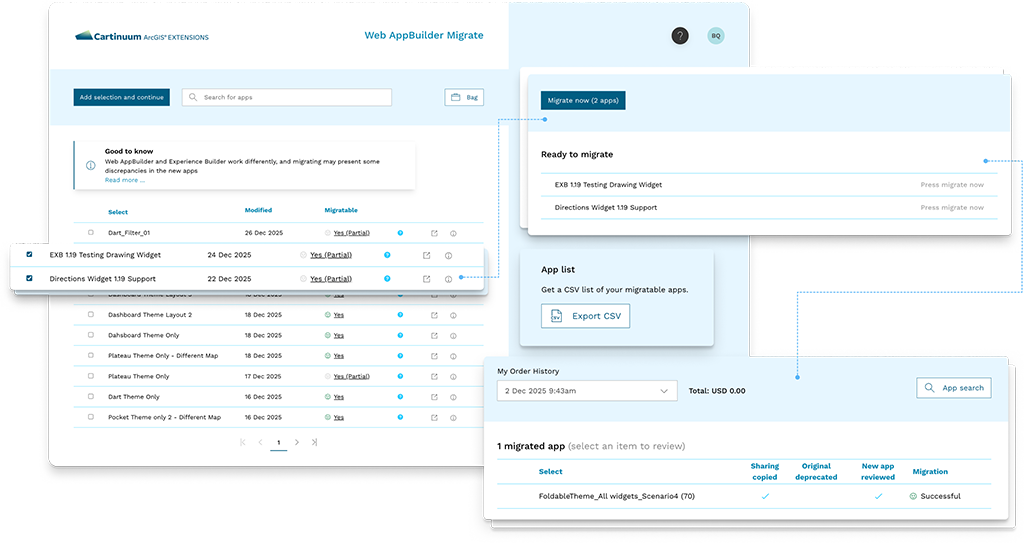
Controlled workflows that power a smooth, confident migration
These features give ArcGIS administrators a clear, efficient, and controlled workflow for moving from Web AppBuilder to Experience Builder.
Search
Free evaluation
Review
Publish
Coordinate the sharing of your new apps with users and streamline the deprecation of legacy Web AppBuilder applications.
FAQs
How do I migrate my apps with Web AppBuilder Migrate?
Simply connect to your ArcGIS Online or ArcGIS Enterprise account, select the apps you want to convert, and let the migration tool do the rest.
How do I know which apps can be migrated?
The search results in your WebApp Builder Migrate will show the migratability status of each application. This status identifies differences there might be between your original Web AppBuilder app and the Experience Builder app generated by the migration tool. Learn more about the migratability status.
Which ArcGIS Enterprise versions are supported by Web AppBuilder Migrate?
Our team is dedicated to updating Web AppBuilder Migrate to support the latest release of ArcGIS Enterprise, we currently support versions 11.0 to 11.5. Older versions of ArcGIS Enterprise have fewer Experience Builder widgets available than are present in Web AppBuilder. You can see the list of available widgets and the version of ArcGIS Enterprise that they were introduced.
What does Web AppBuilder Migrate cost?
You only pay for the apps you choose to migrate, the fee is USD 25 per app with bundle pricing available for larger app quantities.
Can I use Web AppBuilder Migrate to help deliver services to my customers?
We already have a number of Esri distributors and partners who use the tool to deliver migration services to their customers, please contact us if you wish to explore how we can support you.
Does Web AppBuilder Migrate work with Web AppBuilder developer edition?
No, Web AppBuilder Migrate connects to your ArcGIS portal (Online or Enterprise) to discover apps in your organization.
The Web AppBuilder developer edition runs separately from your ArcGIS portal, which means Web AppBuilder Migrate is unable to access any apps in the developer edition.
Additionally, the developer edition is used to add custom widgets and themes to your applications. Since the equivalent versions of these items are not available in Experience Builder, we are unable to work with applications built in developer edition.
Ready to get started?
Let us help you find the solution that works best for you.