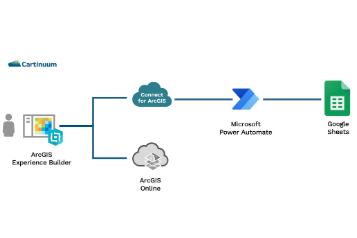
Connect for ArcGIS from Cartinuum has a range of integration connectors for commonly used business systems. The HTTP Request Data Source, extends the range of systems you can connect to with tools such as Microsoft Power Automate.
In this video tutorial, we show how you can configure a workflow in Power Automate to fetch service requests that are stored in a Google Sheets spreadsheet.
This tutorial takes you through the following:
- Understanding the format of the JSON request sent from Connect for ArcGIS to Power Automate, and the response returned at the end of the flow.
- Configuring your Power Automate flow to receive a request from Connect for ArcGIS.
- Manipulating the JSON data to add records to the response.
- Setting up your data source and layer link in Connect for ArcGIS to trigger the Power Automate flow.
- Adding your data into ArcGIS Experience Builder using the Connect for ArcGIS widget.


/Email%20Module%20Assets/linkedin.png)
/Email%20Module%20Assets/cartinuum_logo.png)
